Checklist Status Sets
A companion plugin to Status Sets — applies the same reusable status sets you define there to checklist items inside your notes, not just the file tree.
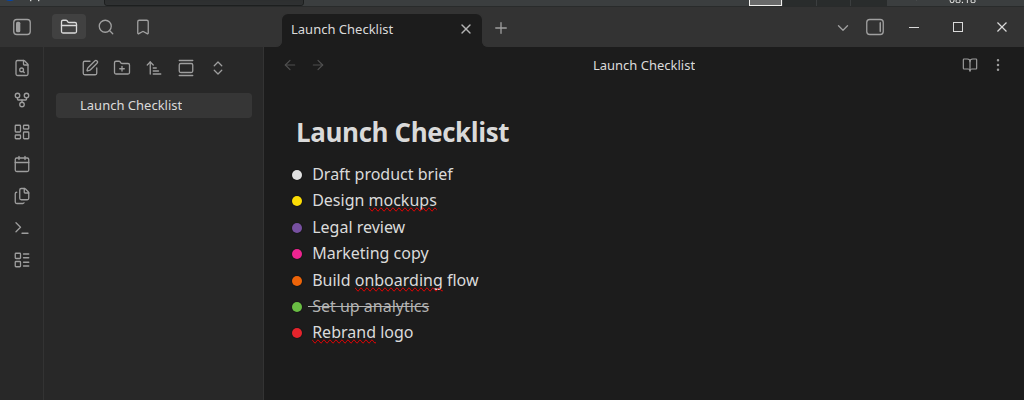
What this is (and isn't)
Status Sets decorates files and folders in the file tree with status
dots. This plugin decorates checklist items (- [ ] tasks) inside a
note's content, using the exact same status sets, colors, and icon styling
— at the whole-file level, or scoped to a specific block or heading.
Status sets themselves — their names, colors, completed flag — are never created, edited, or duplicated here. All of that data is owned exclusively by Status Sets; this plugin only reads it, live, via a small public API Status Sets exposes for this purpose.
Features
- Three assignment scopes: govern an entire file, a specific block (with optional inheritance to nested subtasks), or everything under a heading.
- Traffic-light status icons replace the native checkbox glyph entirely, rendered identically to Status Sets' file-tree dots — including Glow, if you have that on.
- Left-click to cycle a task through its status set's statuses; right-click for the full manual picker (Status Sets' own popup, reused as-is).
- Hide completed — actually removes completed-status tasks from the rendered note, in both Live Preview and Reading view.
- Works in both Live Preview and Reading view.
Requirements
- Status Sets
(
file-folder-status-icons) must be installed and enabled. This plugin's settings hide themselves with an install/enable prompt until it is. - Desktop only (same as Status Sets).
Installation
See Installation.
A note on renaming statuses
Because a task's status is written into the note itself as a single character (see Markdown Status Marker), renaming a status in Status Sets does not retroactively update tasks already written with the old marker — the same way renaming a tag doesn't retroactively update every note that used the old name. This is documented in detail on that page.