Overview
Like Quiet Outline, but louder! Loud Outline shows each note's headings, tasks and lists as expandable/collapsible rows directly inside Obsidian's native file explorer — the same interaction as a folder expanding to reveal the files inside it, except a file expands to reveal its own outline.
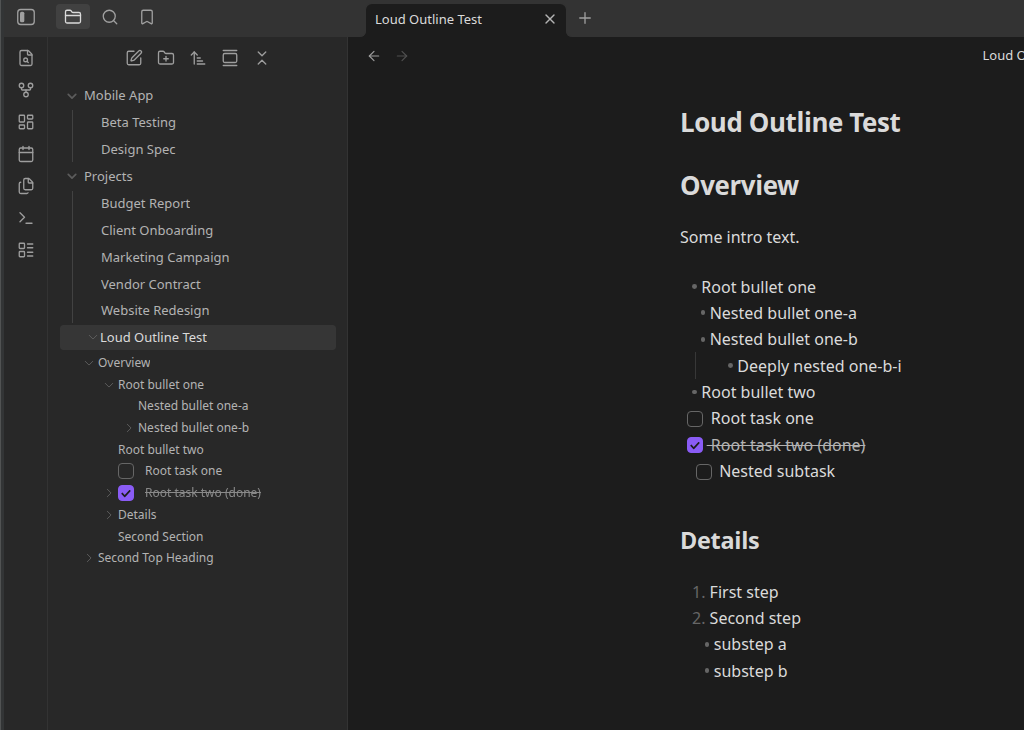
No separate outline pane to open, position, or keep in sync with the active file. The file tree already is the file tree — Loud Outline just teaches it to go one level deeper.
What you could use it for
- Jumping straight to a specific section of a long note from the sidebar, without opening it first or hunting through a separate outline pane.
- Getting a feel for a note's shape — how many sections, how deep, how much is task-shaped — just by glancing at the tree, collapsed by default so it stays out of the way until you want it.
- Treating a note's own root-level checklist as a quick-reference task list, expandable right next to the file that owns it.
- Skimming a folder of meeting notes or project docs where the interesting structure is in each note's headings and checklists, not in more files and folders.
How it works
- Every markdown file with at least one heading (or, if enabled, at least one list/task item) gets a small collapse arrow next to it in the file explorer — exactly like a folder.
- Click the arrow to expand the file and reveal its outline: headings nested by level, with any tasks and lists nested underneath whichever heading they actually sit under in the note (or directly under the file, if they're above any heading).
- Click a heading, task, or list row to open the note (if it isn't already open) and jump the cursor straight to that line.
- Everything starts collapsed, the same as a fresh folder — expand only what you're looking at.
Where to go next
- New to the plugin? Start with Installation and Your First Look.
- Want the full picture on how headings nest? See Headings in the Tree.
- Curious exactly how tasks and lists get placed in the tree? See Tasks and Lists.
- Something not behaving as expected? Check the FAQ and Troubleshooting.